How the Amazon Fake Order Confirmation Email Scam Works
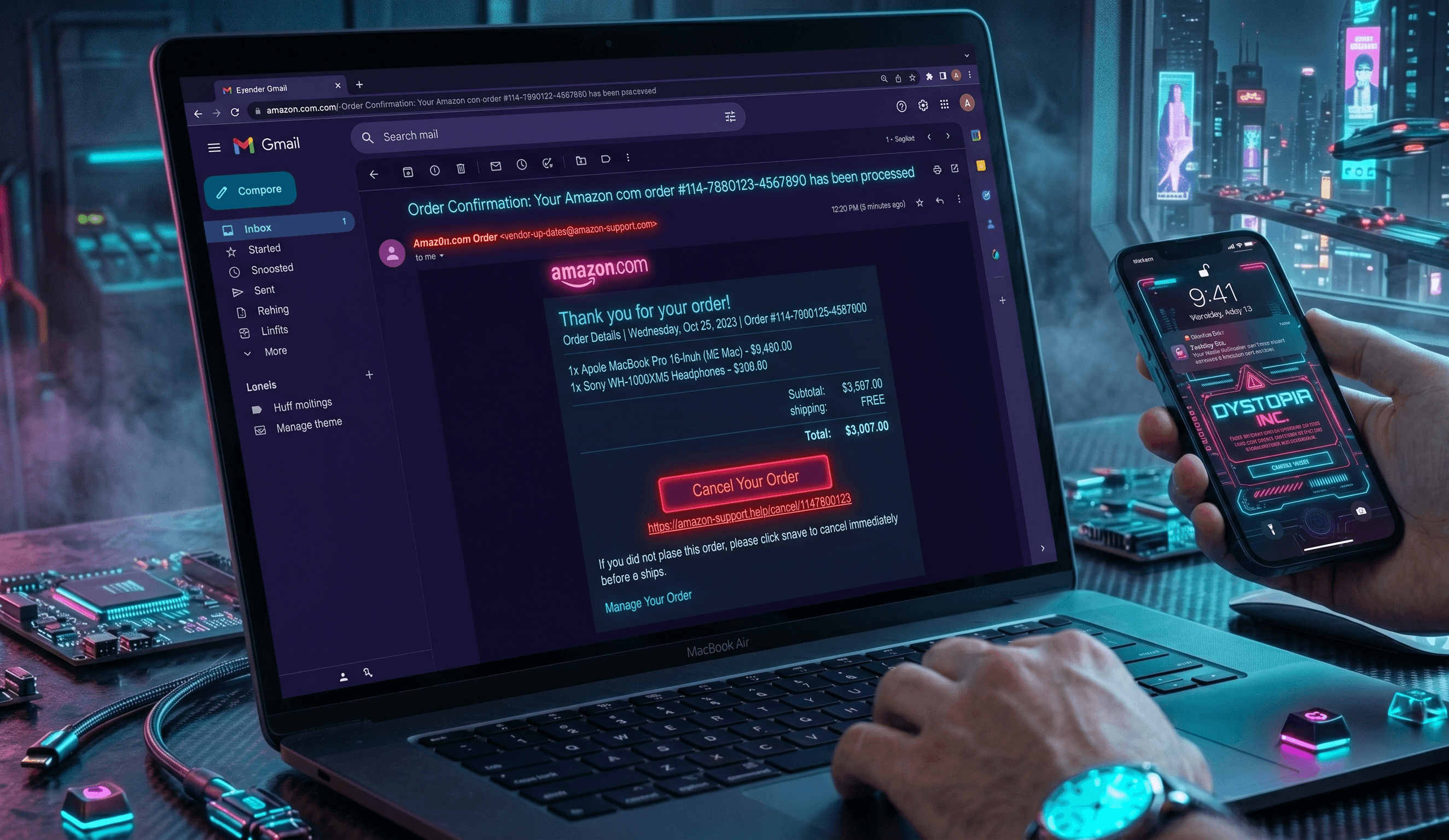
Scammers send you an email that looks identical to a real Amazon order confirmation. The email appears to come from Amazon with their logo, familiar formatting, and professional language. It might say something like "Your order for a MacBook Pro ($1,299) has been confirmed" or "Your iPhone 16 purchase is being processed." The catch is that you never actually placed this order.
The email includes a button or link that says "View Your Order," "Confirm Purchase," or "Update Payment Method." When you click it, you're taken to a fake website that looks exactly like Amazon's login page. The scammer has built this fake site to capture your login credentials, including your email address and password. Once they have this information, they can access your real Amazon account, change the password to lock you out, add their own payment methods, and make purchases using your stored credit cards.
Some versions of this scam go a step further. Instead of a fake login page, the email says there's a problem with your payment method and asks you to enter your credit card number, expiration date, and CVV directly into the email response. Others claim you need to "verify your identity" to release a package and request personal information like your Social Security number or driver's license number. The scammers use this stolen data to commit identity theft, open new accounts in your name, or sell your information on the dark web.
The timing is deliberate. Scammers often send these emails during busy shopping seasons like the holidays, Prime Day, or back-to-school season when people are making more purchases and may not immediately question a confirmation email. They also send them randomly hoping some recipients have actually ordered something recently and will fall for the false confirmation.
Red Flags to Watch For
- The email arrived but you didn't place any order. This is the most obvious red flag. If you get an order confirmation for something you didn't buy, do not click any links in that email.
- The email address it came from is slightly different from Amazon's official domain. Real Amazon emails come from addresses ending in @amazon.com. Fake ones might use @amazon-secure.com, @amazons-support.com, or other variations.
- The email contains spelling or grammar mistakes, awkward phrasing, or inconsistent formatting. Amazon's official emails are professionally written and error-free.
- The email urgently asks you to "confirm your identity," "verify your payment," or "update your information" within 24 hours. Amazon rarely uses urgent language in legitimate emails.
- The sender asks for personal information directly in the email, such as your password, full credit card number, or Social Security number. Amazon will never ask for this information via email.
- The link in the email does not actually point to Amazon.com. Hover over the link (don't click it) to see the URL. Fake versions often use shortened URLs or domains that look similar to Amazon but aren't exact.
- The email offers a refund, discount, or reward that seems too good to be true, especially if you don't have an active Amazon Prime subscription or recent purchase history.
Real Victim Report
One Jacksonville, Florida resident reported to the FTC that she received an order confirmation email for an Apple iPad Pro valued at $1,199. Confused because she had only browsed Amazon the previous day without making a purchase, she clicked "View Order Details" to check her account. The fake page looked so realistic, with the same orange logo and white background as the real Amazon site, that she entered her email address and password without hesitation. Within hours, her actual Amazon account was compromised, and scammers purchased $3,400 worth of electronics using her stored credit card before she noticed suspicious activity on her bank statement.
What To Do If You've Been Targeted
- Do not click any links or download any attachments from the suspicious email. If you already clicked a link, do not enter any information on the page that appears.
- Stop all contact with the scammer. Do not respond to the email, do not call any phone numbers listed in it, and do not engage further.
- If you entered your Amazon password on a fake site, immediately log in to your real Amazon account (go directly to amazon.com in your browser, not through the email link) and change your password to something strong and unique. If you can't log in because the password has been changed, use Amazon's "Forgot Password" feature to regain access.
- Check your Amazon account for unauthorized orders, unauthorized payment methods added to your account, and any changes to your account settings like your email address or phone number. Cancel any unauthorized orders and remove any unfamiliar payment methods.
- Report the phishing email to Amazon directly by forwarding it to phishing@amazon.com. Amazon's security team uses these reports to identify and shut down fake pages.
- File a report with the Federal Trade Commission at reportfraud.ftc.gov. Select "Phishing" as the scam type and provide details about the email.
- If you provided your credit card number or other payment information, contact your bank or credit card company immediately to report potential fraud and ask about freezing or canceling compromised cards.
- Place a fraud alert with the three major credit bureaus (Equifax, Experian, and TransUnion) by contacting one of them, and they will notify the other two. This makes it harder for someone to open new accounts in your name. If personal information like your Social Security number was compromised, consider a credit freeze or enrolling in identity protection monitoring through a service like Aura (aura.com/recentscam) to watch for unauthorized accounts opened in your name.
How To Protect Yourself Going Forward
Never click links or buttons in unsolicited emails, even if they claim to be from Amazon. Instead, if you think there might be an issue with an order, go directly to amazon.com by typing the address into your browser yourself and log in to check your account. Bookmark the real Amazon login page so you always have a direct link to it. Enable two-factor authentication on your Amazon account through your security settings. This adds an extra layer of protection by requiring a code from your phone whenever someone tries to log in from a new device, even if they have your correct password.
Be skeptical of any email that creates a sense of urgency or claims there's a problem requiring immediate action. Real Amazon notifications about actual orders are calm and matter-of-fact. Scammers use pressure tactics like "Act now," "Confirm within 24 hours," or "Your account will be suspended" to make you act without thinking. Finally, keep your devices secure by running updated antivirus software and keeping your operating system and browser updated. These updates patch security holes that scammers sometimes exploit.
Frequently Asked Questions
I clicked the link in a suspicious Amazon email and entered my password. What should I do immediately? ▼
How can I tell if an email is really from Amazon or a fake? ▼
Can scammers actually make purchases on my Amazon account if they have my password? ▼
Written By
Our editorial team aggregates and verifies scam reports from threat-intelligence feeds (URLhaus, OpenPhish, PhishTank) and U.S. government complaint data (FTC, FCC), plus community submissions. See our methodology for how every record and article is sourced and reviewed. Read our methodology →